
How to Transfer Blogger to WordPress (Even if you aren’t techy!)

Are you ready to transfer your Blogger blog to a self-hosted WordPress platform? You’ve come to the right place!
Transferring Blogger to WordPress
One of the most asked questions I get in my private Facebook group for mom bloggers is “How do I transfer my Blogger blog to WordPress.” So I thought I’d put a quick tutorial guide for all of you who are looking to do the same thing! I hope that after reading my guide, you’ll realize IT’S NOT THAT HARD!
You’ll probably need about 1 hour to complete the entire process from purchasing your new hosting, installing WordPress & transferring your Blogger blog.
Before you do anything. You will want to secure hosting and a domain (if you don’t already own one) for your blog. My recommendation is to go with BlueHost as they are very affordable and their customer service is top notch.
Step 1. Check out [ this video ] on how to get hosting and domain name for your blog.
Step 2. Once you’ve set up your domain name, hosting account and WordPress, I want you to log into your Blogger dashboard and locate the “Backup Content” under Settings -> Other.
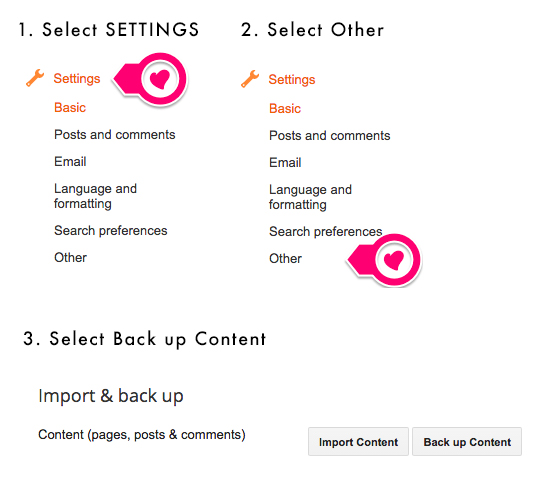
Step 3. A pop-up will appear and you should click on “Save to your Computer” (It will download as an .xml file)
Step 4. Once you’ve downloaded your Blogger blog. Login to your WordPress dashboard and locate “Import” under the Tools menu.
Step 5. Click on “Blogger” from the list of available options. Click on “Install” once you see the button. This will immediately install a Blogger importer tool for you.
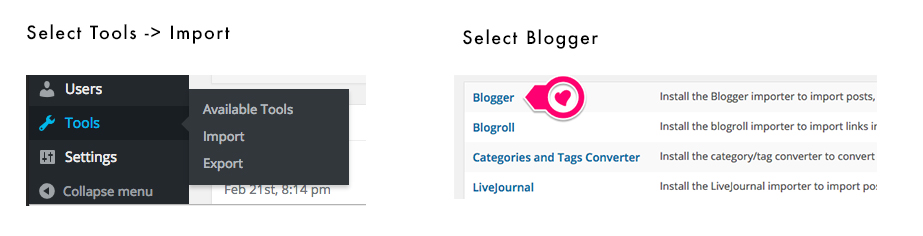
Step 6. Click on “Activate the plugin & Run Importer” to get started
Step 7. You will then be prompted to upload the Blogger .xml file you previously downloaded in step 3.
Step 8. WordPress will begin to import your blog posts individually. Assign an author to the blog posts….and you are done! Congrats! That’s all you need to do 🙂

You May Also Like


Okay. This is the push I needed. Thank you!!!
Yay! 🙂
Oh, this has me scared and excited all at once. I want to switch mine over, and this may be what I need. I may be in touch if this non-techy can make it happen. Thanks!
Hi! Will all of my analytics in Blogger go away? That’s the reason I’m so scared! Thanks 🙂 Also, I bought my domain name via Google…does that work with wordpress?
I just went through the process using your tutorial and everything worked perfectly! I will say that my photos did not transfer over, but my theme says that I might need to install an additional plugin to reformat the sizes to fit this theme. Thanks so much for the help!
Yay! Awesome 🙂
Hi Chrystie, this tutorial seems pretty straight forward & not to complicated. Thanks!!! Can you tell me why I would need to switch to a WP platform if I have a (.com) domain name on Blogger? Just your opinion, please.
Thanks, Chrystie! Your instructions are such informative and clear.
I’ve also found an automated Blogger to WordPress migration tool called cms2cms. And I’m going to try it soon. It’s said that free Demo migration is also available. Have you heard something about it?